
Google Business Profile · Local SEO
Christmas Opening Hours on Google: The New 10-Second Way to Update Them
Google Business Profile now lets you type your holiday hours in plain English. Here's how to use it, and what to check before you hit save.
It's Christmas Eve. A customer checks Google, sees "Open", drives over and finds the shutters down.
That's a lost sale, a likely one-star review, and a customer who won't trust your listing again.
Updating holiday hours on Google Business Profile has always been a chore. You click through dropdown after dropdown, date by date, so most businesses either skip it or leave it to the last minute.
Google has just made it a lot simpler. Below is how the new feature works, how I'd use it for Christmas and New Year, and the few things worth checking before you hit save.
What's new in Google Business Profile?
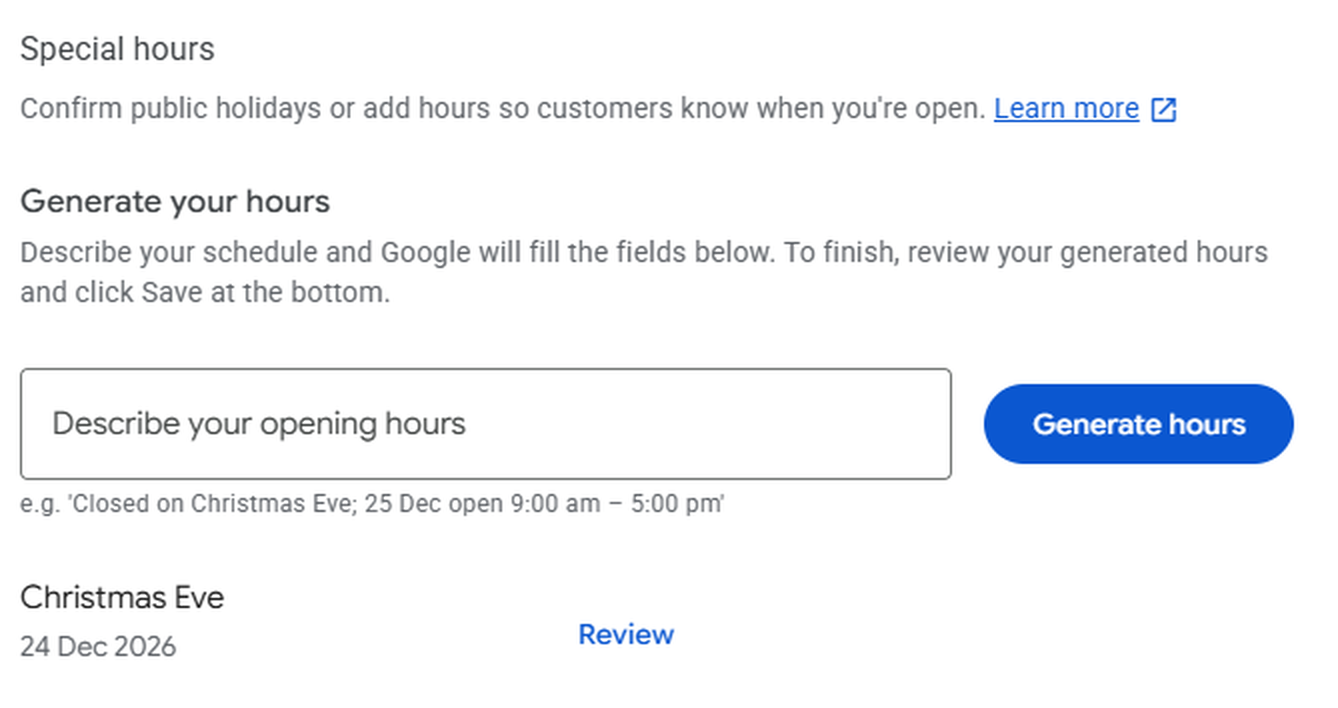
In the Hours tab, under Special hours, there's now a field called Generate your hours.
Instead of setting each date manually, you describe your schedule in a sentence. Google's own example:
Click Generate hours, and Google fills in the fields. You review the result and click Save.
It works for regular weekly hours too, such as "Closed for lunch 2 to 3 PM" or "Tuesdays by appointment only".
How to use it, step by step
- Open your Business Profile on Google Search or Maps and click Edit profile.
- Go to the Hours tab and scroll to Special hours.
- Type your full holiday schedule into Describe your opening hours.
- Click Generate hours.
- Review every date. This step matters most.
- Click Save.
Pro tip: cover the whole festive season in one go, for example:
"Christmas Eve 9am–2pm, closed Christmas Day and Boxing Day, 27–31 Dec 10am–4pm, closed New Year's Day."
Google is already prompting you
Under Special hours, Google lists upcoming public holidays with a Review button next to each one, such as Christmas Eve or New Year's Day.
Confirm them all, even if your hours aren't changing. Confirmed holiday hours tell customers the information has been checked and is reliable. Unconfirmed holidays leave room for doubt, and sometimes for an "hours might differ" warning on your listing.
What to watch out for
I've spent more than 15 years working with Google's tools, and my rule for anything AI-generated is the same: it saves you the typing, not the checking. Google is using AI to read your sentence, so treat what it fills in as a first draft:
- AM/PM mix-ups: did "9 to 5" land in the right half of the day?
- Missing dates: check that every day you mentioned was picked up.
- Overlaps: make sure special hours didn't overwrite your regular weekly hours.
- Main hours must be set: special hours only appear on your profile if it's set to "Open with main hours".
- Rollout: the feature may not be live on every account yet. If you can't see it, use the standard editor for now.
Why this matters for local SEO
Opening hours look like admin, but they affect both visibility and conversions:
- "Open now" searches: missing or wrong hours can keep you out of these results, and they peak over the holidays.
- Trust signals: a complete, current profile looks more credible to customers and to Google.
- Reviews: a customer at a locked door is one of the most common sources of a bad review.
- Control: Google sometimes suggests or updates business information on its own. Updating it yourself keeps you in charge.
While you're in there
A few other quick wins worth doing at the same time:
- Publish a Google post about your festive hours or seasonal offers.
- Reply to any outstanding reviews, because December traffic will read them.
- Check your "More hours" (delivery, click-and-collect, takeaway) if your category supports them.
Summary
"Generate your hours" is a small update, but it takes the tedious part out of a job most businesses put off: type one sentence, check it, save it.
Your Google listing is often the first thing a customer sees, and in December it's usually the last thing they check before leaving the house. If you do one thing on your profile this week, make it this.
Want a pre-Christmas check of your Google Business Profile?
We'll review your profile with you, hours, reviews and posts, and flag anything costing you customers. No strings attached.
Get in touch with ACM